IP Address
A unique string of numbers separated by periods that identifies each computer using the Internet Protocol to communicate over a network.
IP stands for Internet Protocol and describes a set of standards and requirements for creating and transmitting data packets, or datagrams, across networks. The Internet Protocol (IP) is part of the Internet layer of the Internet protocol suite. In the OSI model, IP would be considered part of the network layer.
Every website (Disney, Amazon, Apple, etc.) has a unique IP address, but it goes by its name instead (Disney.com, Amazon.com, Apple.com.) But without IP addresses you could not connect with them and they could not share information with you.
The common type of IP address (is known as IPv4, for "version 4"). Here is an example of what an IP address might look like:
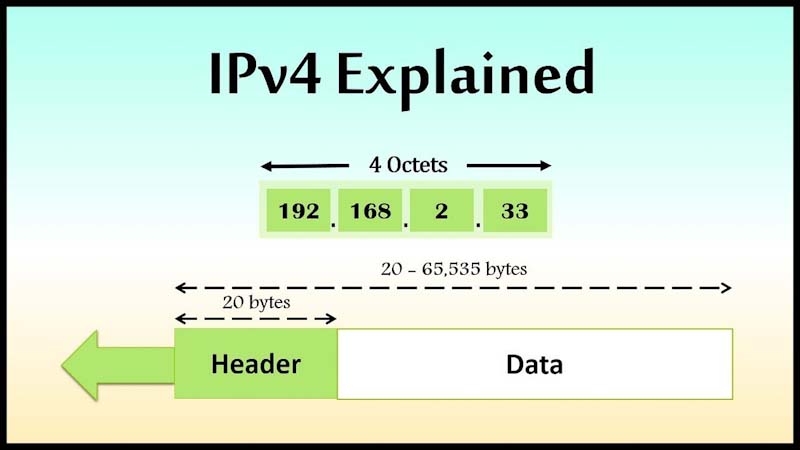
As you can see in the picture above An IPv4 address consists of four numbers, each of which contains one to three digits, with a single dot (.) separating each number or set of digits. Each of the four numbers can range from 0 to 255.
IP addresses are binary numbers but are typically expressed in decimal form (IPv4) or hexadecimal form (IPv6) to make reading and using them easier for humans. Without this numeric protocol, sending and receiving data over the World Wide Web would be impossible.
Now you may wonder what happens if we ran out of IP addresses?
Suddenly, major companies (even Microsoft!) were scrambling to buy unused IP addresses from other companies...for millions of dollars.
What went wrong?
The past decade has seen explosive growth in mobile devices including mobile phones, notebook computers, and wireless handheld devices. The format for IPv4 was not designed to handle the sheer number of IP addresses. Fortunately, there was a backup IP address type waiting in the wings.
Goodbye IPv4. Hello IPv6.
It is called IPv6 and it offers a maximum number of IP address for today and for the future. Whereas IPv4 supports a maximum of approximately 4.3 billion unique IP addresses, IPv6 supports, in theory, a maximum number that will never run out.
A theoretical maximum of 340,282,366,920,938,463,463,374,607,431,768,211,456.
To be exact. In other words, we will never run out of IP addresses again.
An IPv6 address consists of eight groups of four hexadecimal digits. If a group consists of four zeros, the notation can be shortened using a colon to replace the zeros. Here is an example IPv6 address:
2001:0db8:85a3:0000:0000:8a2e:0370:7334
In both IPv4 and IPv6, remembering the IP address of every device is not possible, except on the smallest of networks. Name resolution provides a way to lookup an IP address from an easier to use name.
On the internet, name resolution is handled by the Domain Name System (DNS). With DNS, a name in the format host.domain can be used in place of the destination’s IP address. When the connection is initiated, the source host will request the IP address of the destination host from a DNS server. The DNS server will reply with the destination’s IP address. This IP address will then be used for all communications sent to that name.
A Packet
is a small amount of data sent over a network, such as a LAN or the Internet. Like a real-life package, each packet includes a source and destination as well as the content (or data) being transferred.
In networking, a packet is a small segment of a larger message. Data sent over computer networks*, such as the Internet, is divided into packets. These packets are then recombined by the computer or device that receives them.
Suppose Jane is writing a letter to Leo, but Leo’s mail slot is only wide enough to accept envelopes the size of a small index card. Instead of writing her letter on normal paper and then trying to stuff it through the mail slot, Jane divides her letter into much shorter sections, each a few words long, and writes these sections out on index cards. She delivers the group of cards to Leo, who puts them in order to read the whole message.
This is like how packets work on the Internet. Suppose a user needs to load an image. The image file does not go from a web server to the user's computer in one piece. Instead, it is broken down into packets of data, sent over the wires, cables, and radio waves of the Internet, and then reassembled by the user's computer into the original photo.
*A network is a group of two or more connected computers. The Internet is a network of networks — multiple networks around the world that are all interconnected with each other.
An Insider Breakdown of How Network Packet Works:
Though not always followed to the latter, the conceptual framework laid out by the OSI model, poses a range of protocols through which data is broken into smaller layers before being transmitted, and as well-assembled when they reach the destination address.
Generally, the networks we have today operate on the TCP/IP protocol stack which gets transmitted over physical networks derived from the Ethernet. Before we go further, it is important we quickly address a common mistake that circles the misuse of some terms in place of the term “network packet.” Segments are the units of data sent from the transport protocol (most likely TCP) to the network layer.
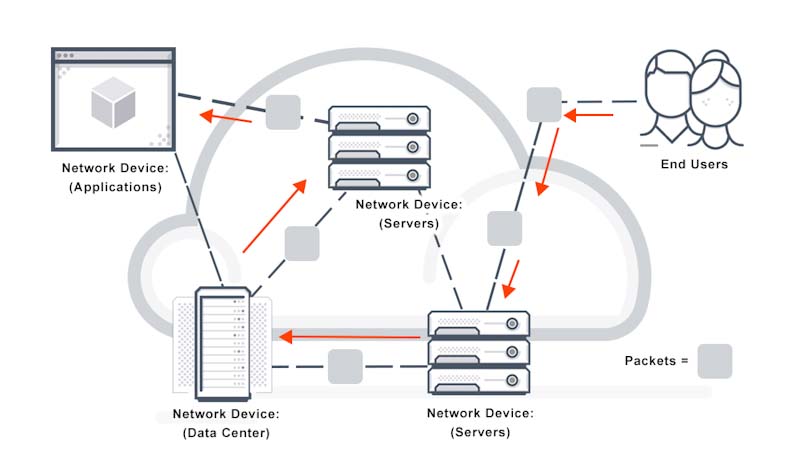
-Packet Travelling
Datagram there are two forms: UDP datagram and the IP datagram. And they are differentiated based on the protocol in use at the time being addressed. If the split data is being processed by the IP network protocol, then it is an IP datagram. And if at the transport layer it is being transported by UDP, then it is a UDP datagram.
Frame refers to the physical presentation or container for a network protocol.
At the Transport Layer
The TCP/IP resumes its function from the computer by receiving a set of commands or information from a software application, which it will encapsulate within TCP segments, or just one segment depending on the size of the data. Subsequently, destination port numbers and source are assigned to a segment, before splitting it into various segments for ease of transportation over the network. The segments are then forwarded to the network layer. Though split, these segments represent an accurate entirety of the original information.
At the Network Layer
Here the IP receives the segments, and encapsulates them into multiple IP datagrams, one for each received TCP segment. After encapsulation, the IP assesses and assigns the source information, destination IP addresses, identifiers as well as QoS parameters to each datagram, which helps determine the best physical path to be taken by the datagram. After the assignments, the datagrams are forwarded to a network interface card.
At the Data Link and Physical Layer
The IP datagrams received by the NIC are encapsulated in the data link layer into an Ethernet frame. Subsequently, the frame acts as a series of binary signals placed on a physical structure (such as fiber, coax, hubs, coax, etc.) attached to the NIC. The NIC then acts as a network gateway from which your computer connects through cables (such as fiber, coax, etc.) or wireless to a network to reach a recipient computer or device. From the NIC the frames are transported as signals to the destination IP address – device – at which end they are reassembled to display original information (such as texts, graphics, etc.) or initiate commands.
Parts of a Network Packet
A Network packet is divided into three parts; the header, payload, and trailer, each containing values that are characteristic of it.
Header – The header contains the source address, a destination address, protocol, and packet number.
- Source address indicates where the packet is coming from
- Destination address points to the receiving IP address
- The protocol helps identify what type of packet is being transferred, whether it is an email, a web page, a video, etc.
- The packet number – each packet has two identifying numbers; the first indicating how many packets a piece of information was split into, and the second indicates the place of the individual packet as a part of the complete information.
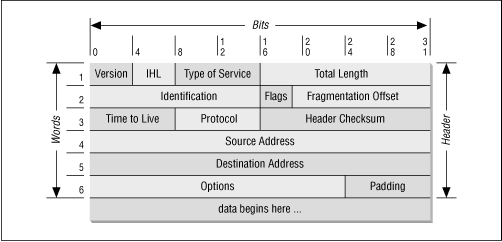
-This is how a Packet looks like
Payload or data –
Which refers to the actual data being transported by the packet. Depending on the network, the size can vary between 48 bytes to 4 kb range.
Trailer –
Contents of a packet trailer differ with each network type. Generally, a trailer contains a few bits that inform the recipient device that it has gotten to the end of the packet, as well as a Cyclic Redundancy Check (CRC), which enables the computer to determine if all the packets were received completely.
Packet Loss: The Woe of Network Packets
Following the analogy used earlier, if the video was unable to load completely in your friend’s computer, the chances are that some network packets might have been lost in the traffic. In an office scenario where the transfer of mission-critical files among the staff (in the same or different locations) is very common, continuous requests for re-transmission of files can affect productivity and increase downtimes.
-The Woe of Network packet loss
A network packet loss occurs when a packet is unable to get to its destination, either because it was dropped or lost in transit – resulting in low quality of experience (QoE). A packet loss though less likely to occur on cabled networks, is not restricted to wireless internet connections, owing to a bad WiFi signal, faulty cables, network congestion’s, faulty router, etc.
There are a few ways to manage, fix or limit the occurrence of a network packet loss such as:
- By removing sources of interference
- Updating all network device software
- Applying QoS settings and network policies
- Checking physical connections
Packet loss occurs on all networks. Sometimes all that must be done to improve performance is to check their connections, restart the network or computer, update software, or remove any non-essential devices from the network. In enterprise settings, networks serving high amounts of traffic and requiring high standards of security, network visibility has become the key to understanding network traffic and packet loss. Special network monitoring software has been developed to give admins a clearer picture of the activity on their networks. By pinpointing the offending culprits of packet loss, IT departments are far ahead of the curve of setting out an effective solution to return to a high performing network.
Routing
is the process of selecting a path for traffic in a network or between or across multiple networks. Broadly, routing is performed in many types of networks, including circuit-switched networks, such as the public switched telephone network, and computer networks, such as the Internet. Network routing is the process of selecting a path across one or more networks.
In packet-switching networks, such as the Internet, routing selects the paths for Internet Protocol (IP) packets to travel from their origin to their destination. These Internet routing decisions are made by specialized pieces of network hardware called routers.
Consider the image below. For a data packet to get from Computer A to Computer B, should it pass through networks 1, 3, and 5 or networks 2 and 4? The packet will take a shorter path through networks 2 and 4, but networks 1, 3, and 5 might be faster at forwarding packets than 2 and 4. These are the kinds of choices network routers constantly make.
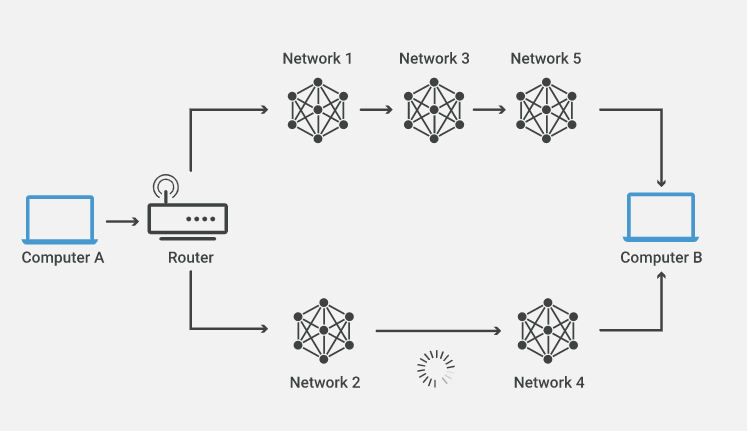
-Data Packet to get from Computer A to Computer B
How does routing work?
Routers refer to internal routing tables to make decisions about how to route packets along network paths. A routing table records the paths that packets should take to reach every destination that the router is responsible for. Think of train timetables, which train passengers consult to decide which train to catch. Routing tables are like that, but for network paths rather than trains.
Routers work in the following way: when a router receives a packet, it reads the headers* of the packet to see its intended destination, like the way a train conductor may check a passenger's tickets to determine which train they should go on. It then determines where to route the packet based on information in its routing tables.
Routers do this millions of times a second with millions of packets. As a packet travels to its destination, it may be routed several times by different routers. Routing tables can either be static or dynamic. Static routing tables do not change. A network administrator manually sets up static routing tables. This essentially sets in stone the routes data packets take across the network unless the administrator manually updates the tables.
Dynamic routing tables update automatically. Dynamic routers use various routing protocols (see below) to determine the shortest and fastest paths. They also make this determination based on how long it takes packets to reach their destination — similar to the way Google Maps, Waze, and other GPS services determine the best driving routes based on past driving performance and current driving conditions. Dynamic routing requires more computing power, which is why smaller networks may rely on static routing. But for medium-sized and large networks, dynamic routing is much more efficient.
What are the main routing protocols?
In networking, a protocol is a standardized way of formatting data so that any connected computer can understand the data. A routing protocol is a protocol used for identifying or announcing network paths.
The following protocols help data packets find their way across the Internet:
IP: The Internet Protocol (IP) specifies the origin and destination for each data packet. Routers inspect each packet's IP header to identify where to send them.
BGP: The Border Gateway Protocol (BGP) routing protocol is used to announce which networks control which IP addresses, and which networks connect to each other. (The large networks that make these BGP announcements are called autonomous systems.) BGP is a dynamic routing protocol.
The below protocols route packets within an AS:
OSPF: The Open Shortest Path First (OSPF) protocol is commonly used by network routers to dynamically identify the fastest and shortest available routes for sending packets to their destination.
RIP: The Routing Information Protocol (RIP) uses "hop count" to find the shortest path from one network to another, where "hop count" means number of routers a packet must pass through on the way. (When a packet goes from one network to another, this is known as a "hop.")
What is a router?
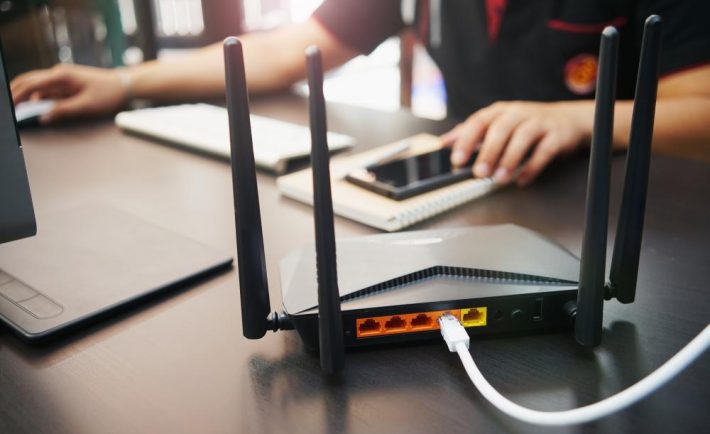
-A router
A router is a piece of network hardware responsible for forwarding packets to their destinations. Routers connect to two or more IP networks or subnetworks and pass data packets between them as needed. Routers are used in homes and offices for setting up local network connections. More powerful routers operate all over the Internet, helping data packets reach their destinations.