W3C
W3C (World Wide World Consortium) was started in 1994 to lead the Web to its full potential by developing common protocols that promote its evolution and ensure its interoperability.
The mission of W3C is to make the Web accessible to all users (despite differences in culture, education, ability, resources, and physical limitations). W3C also coordinates its work with many other standards organizations such as the Internet Engineering Task Force, the Wireless Application Protocols (WAP) Forum and the Unicode Consortium.
W3C is hosted by three universities:
- Massachusetts Institute of Technology in the U.S.
- The French National Research Institute in Europe
- Keio University in Japan
W3C Members
Because the Web is so important (both in scope and in investment) that no single organization should have control over its future, W3C functions as a member organization.
Some well known members are:
- IBM
- Microsoft
- America Online
- Apple
- Adobe
- Macromedia
- Sun Microsystems
W3C Recommendations
The most important work done by the W3C is the development of Web specifications (called "Recommendations") that describe communication protocols (like HTML and XML) and other building blocks of the Web.
Each W3C Recommendation is developed by a work group consisting of members and invited experts. The group obtains its input from companies and other organizations, and creates a Working Draft and finally a Proposed Recommendation. In general the Recommendation is submitted to the W3C membership and director, for a formal approval as a W3C Recommendation.
HTML 5
On January 22nd, 2008, W3C published a working draft for HTML 5. The HTML 5 working group includes AOL, Apple, Google, IBM, Microsoft, Mozilla, Nokia, Opera and many hundred other vendors.
Some of the new features in HTML 5 are functions for embedding audio, video, graphics, client-side
data storage, and interactive documents. HTML 5 also contains new elements like
<nav>,<header>,<footer>, and <figure>.
HTML 5 improves interoperability and reduces development costs by making precise rules on how to handle all HTML elements, and how to recover from errors.
W3C HTML Specifications and Timeline
| Specification | Recommendation |
| HTML 3.2 | 14th Jan 1997 |
| HTML 4.0 | 24th Apr 1998 |
| HTML 4.0.1 | 24th Dec 1999 |
| HTML 5 | 10th Jun 2008 |
Following is the url, modern world web development the url developers refer to while coding:
https://www.w3.org/TR/html52/HTML
HTML stands for Hypertext Markup Language. It is a markup language which defines how a web page will look like. It was built taking inspiration from proofreading in actual publications and newspapers. It is the most widely used language to write web pages.
Though different browsers and based upon the ISP(Internet Service Provider) settings pages appearance may vary but W3C recommendations are clear about how to write pages so that they can be rendered the same way as much as possible.
HTML Document Structure
A typical HTML document will have the following structure −
                    <html>
                    <head>
                            Document header related tags
                    </head>

                    <body>
                            Document body related tags
                    </body>
                    </html>
The <!DOCTYPE html>Declaration
The <!DOCTYPE html> declaration tag is used by the web browser to understand the
version of
the HTML used in the document. Current version of HTML is 5 and it makes use of the
following declaration −
<!DOCTYPE html>
There are many other declaration types which can be used in HTML document depending on
what version of HTML is being used. We will see more details on this while discussing the
<!DOCTYPE html> tag along with other HTML tags.
HTML Tags
As told earlier, HTML is a markup language and makes use of various tags to format the
content. These tags are enclosed within angle braces <Tag Name>.
Except for a few tags, most of the tags have their corresponding closing tags. For
example, <html> has its closing tag </html>
and
<body> tag has its closing tag</body>
tag etc.
-
<!DOCTYPE...>This tag defines the document type and HTML version. -
<html>This tag encloses the complete HTML document and mainly comprises of document header which is represented by<head>...</head>and document body which is represented by<body>...</body>tags. -
<head>This tag represents the document's header which can keep other HTML tags like<title>, <link>etc. -
<title>The<title>tag is used inside the<head>tag to mention the document title. -
<body>This tag represents the document's body which keeps other HTML tags like<h1>, <div>, <p>etc. -
<h1>This tag represents the heading. -
<p>This tag represents a paragraph.
To learn HTML, you will need to study various tags and understand how they behave, while formatting a textual document. Learning HTML is simple as users have to learn the usage of different tags in order to format the text or images to make a beautiful webpage. World Wide Web Consortium (W3C) recommends to use lowercase tags starting from HTML 4.
CSS
CSS stands for Cascading Style Sheets.It describes how HTML elements are to be displayed on screen, paper, or in other media. CSS saves a lot of work. It can control the layout of multiple web pages all at once. External stylesheets are stored in CSS files CSS is used to define styles for your web pages, including the design, layout and variations in display for different devices and screen sizes.
CSS Example
                    body {
                    background-color: lightblue;
                    }

                    h1 {
                    color: white;
                    text-align: center;
                    }

                    p {
                    font-family: verdana;
                    font-size: 20px;
                    }
CSS Solved a Big Problem
HTML was NEVER intended to contain tags for formatting a web page! HTML was created to describe the content of a web page, like:
<h1>This is a heading</h1>
This is a heading
<p>This is a paragraph.</p>
This is a paragraph.
When tags like <font>, and color attributes were added to the HTML 3.2
specification, it started a nightmare for web developers. Development of
large websites, where fonts and color information were added to every
single page, became a long and expensive process.
To solve this problem, the World Wide Web Consortium (W3C) created CSS.
CSS removed the style formatting from the HTML page!
CSS Saves a Lot of Work!
The style definitions are normally saved in external .css files. With an external stylesheet file, you can change the look of an entire website by changing just one file!CSS Syntax
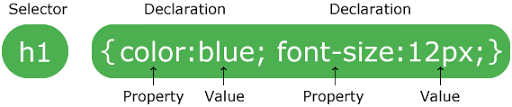
A CSS rule-set consists of a selector and a declaration block:
-CSS Syntax
The selector points to the HTML element you want to style. The declaration block contains one or more declarations separated by semicolons. Each declaration includes a CSS property name and a value, separated by a colon. Multiple CSS declarations are separated with semicolons, and declaration blocks are surrounded by curly braces.