DNS
is one of the most common yet misunderstood components of the web landscape. To put it simply, DNS helps direct traffic on the Internet by connecting domain names with actual web servers. Essentially, it takes a human-friendly request – a domain name like kinsta.com – and translates it into a computer-friendly server IP address – like 216.3.128.12. Because DNS is all about looking up addresses and connecting devices, many people call DNS the “phonebook of the Internet”. Without DNS, you would have to memorize every site’s IP address to access it which…well, that just would not work!
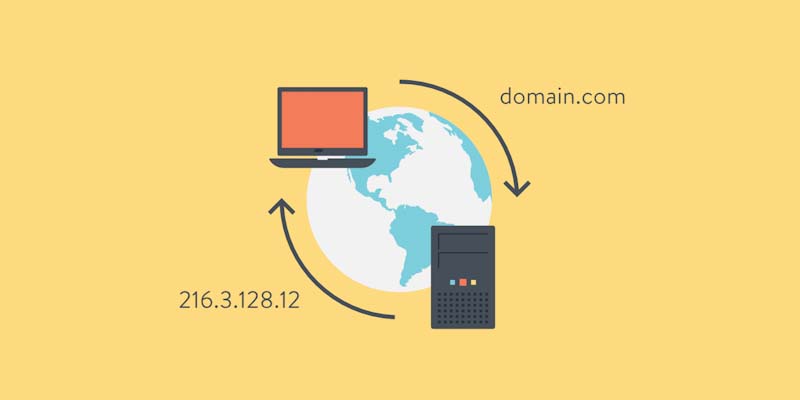
-DNS is all about looking up addresses and connecting devices
Types of DNS
There are several types of DNS records you may need to be aware of. The main records include:
DNS records associate a domain with a web-based service.
- A record
- CNAME records
- MX records
- TXT records
“DNS is the address of every page on the Web 🏠...which means understanding how to make changes and keep DNS files secure is essential.”
How Does DNS Work?
When a user enters a URL in their web browser, DNS gets to work to connect that URL to the IP address of the actual server. This is called DNS name resolution and involves a DNS recursor querying various nameservers to figure out the actual IP address of a server.
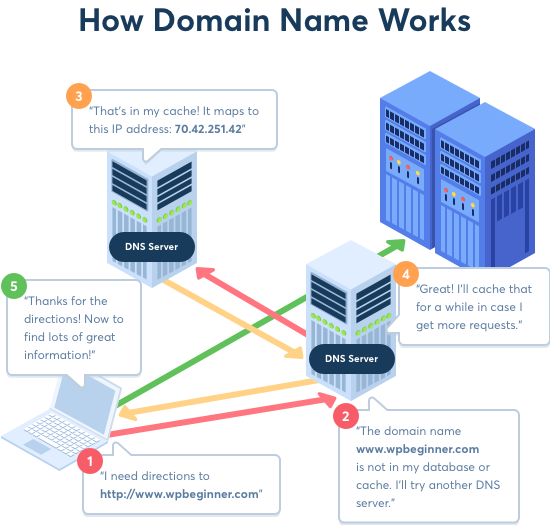
-Four Components of DNS
DNS is mainly concerned with four components:
- Domain Registrar
- Nameservers
- DNS Records
- Web-based services (such as website hosting and email)
Let us talk about these four components and how they work together.
Domain Registrar
A domain registrar is the service provider where domain names are purchased and where domain registration is maintained (such as GoDaddy or Namecheap).
The registrar is where the domain nameservers are specified.
Most registrars include basic DNS service with the cost of domain registration. As a result, unless you add custom nameservers to the domain, the domain will use the registrar’s standard nameservers. This means that in many cases, by default, DNS records are managed by the registrar.
Nameservers
Nameservers are servers much like web servers. However, they are configured to store DNS records rather than to serve up websites or web applications. This means that when you want to change any DNS record you must change those DNS records on the nameservers that have been specified by the registrar or third-party service.
This step is often a little confusing, so let us break this down a little bit by looking at a fictional example:
- Your domain (example.com) is registered at GoDaddy.
- You add Cloudflare’s nameservers to example.com within your GoDaddy account to start using Cloudflare.
- You change a DNS record for example.com at GoDaddy. This change will not do anything because the domain is not using GoDaddy’s nameservers.
- You make the same DNS change for example.com at Cloudflare. This change will be effective because the domain is using Cloudflare’s nameservers.
So, in other words, if you are only using GoDaddy, you will need to update your DNS records with GoDaddy as they control your nameservers.
How DNS and Nameservers Link Together
To show your website’s IP address, click the ‘Sites’ link on the left of your dashboard and then choosing the ‘Info’ tab which will reveal the basic information that enables your website to be located on the Web.
Think about IP addresses like phone numbers. Eventually, we ran out of new numbers to give to customers, so we had to change how we organized the phone numbers in use. It is the same with IP addresses. IPv6 gives us more IP addresses to hand out to new websites. As the Web continues to expand, IPv4 simply ran out of IP addresses!
You may have also heard there are dedicated IP addresses and shared IP addresses. A dedicated IP address is like your landline or mobile phone number; it is unique to you and your website.
A shared IP address, as its name suggests, is shared by several websites. Shared IP addresses are common with websites that use WordPress. It is important to understand that a shared IP address does not mean your website is sharing other resources as well.
What Is DNS Lookup?
Think about the last time you searched for a website. The time it took from the moment you hit the enter key to the website appearing in your browser has a lot to do with DNS lookup. As you already know, the faster your website can be served to a visitor, the better.
As you will remember, when someone types your website’s domain name into their browser, the location of your website must be found. The DNS file associated with your website contains that information including the nameserver and IP address.
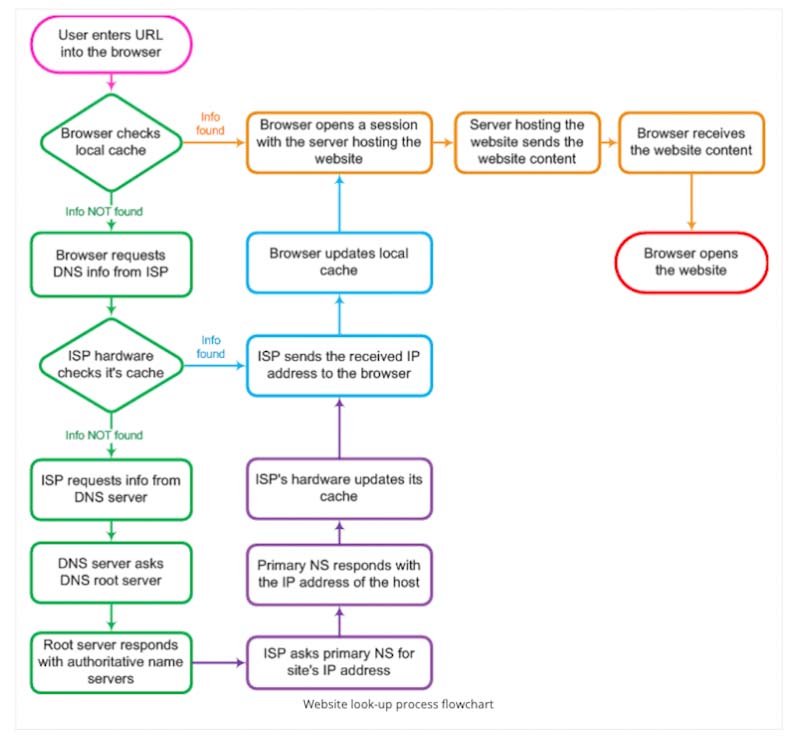
-DNS has a vital role to play to ensure the right webpages are delivered each time a domain is entered or searched for. (Image source: Jolt Wiki)
You can see DNS lookup in action and see how the speed of DNS lookup can impact the performance of your website by using one of the speed test services such as Pingdom.
If you are asking yourself if you have control over DNS lookup speed as you do over other factors that affect the performance of your website, you would be right. In fact, reducing the speed of DNS lookups can be achieved in several ways.
Web Services
In our case, the web service is website hosting. An A record (or AAAA record) must be added to a domain’s nameservers to associate that domain with the web servers that host the website.
There are many other types of web services that are associated with a domain through DNS records: email, SFTP, hosting control panels, webmail applications, and phpMyAdmin just to name a few.
DNS Propagation
When you make a change to the DNS of a given domain – such as updating a DNS record or switching nameservers – those changes take some time to take effect. This time is called propagation.
Propagation varies considerably from one situation to the next. In the case of DNS records, each record has an associated time-to-live (TTL) value. This value determines how quickly changes to DNS records will take effect.
In most cases, TTL for DNS records is set to 1 or 4 hours by default. This means that most of the time DNS changes will take as much as 4 hours to take effect. Higher TTL values are also possible and will mean that when a DNS record is updated that it will take more time before the changes take full effect. In some extreme cases, some might have TTL values as high as one week.
In the case of nameservers, the registrar determines the TTL value and it generally cannot be changed. This means that when you switch to new nameservers it can take from a few minutes up to a day or longer for those changes to take effect.
The hosting provider cannot speed up DNS propagation. What you can do is reduce TTL well in advance of making any changes to DNS records so that the changes propagate as quickly as possible. You can use an online tool like whatsmydns.net to test to see if your DNS changes have finished propagating.
DNS Configuration – How to Set up Your Domain
There are two ways that you will commonly set up your DNS. One method is to simply point your domain’s nameservers to your host’s name servers via your domain name registrar. These are a minimum of two separate URLs that look something like this (you can have more than two URLs, just not fewer):
- ns1.yourhost.com
- ns2.yourhost.com
To Summarize
Hopefully, you understand a little more now about how DNS works. To recap, DNS is used to associate web-based services, such as website hosting and email, with a domain name. This involves four steps:
- The domain must be registered with a domain registrar.
- Nameservers must be specified by the domain registrar.
- DNS records must be added to the nameservers specified by the domain registrar or third-party service such as Cloudflare.
- The DNS records must be fully propagated to associate the domain with each relevant web service.